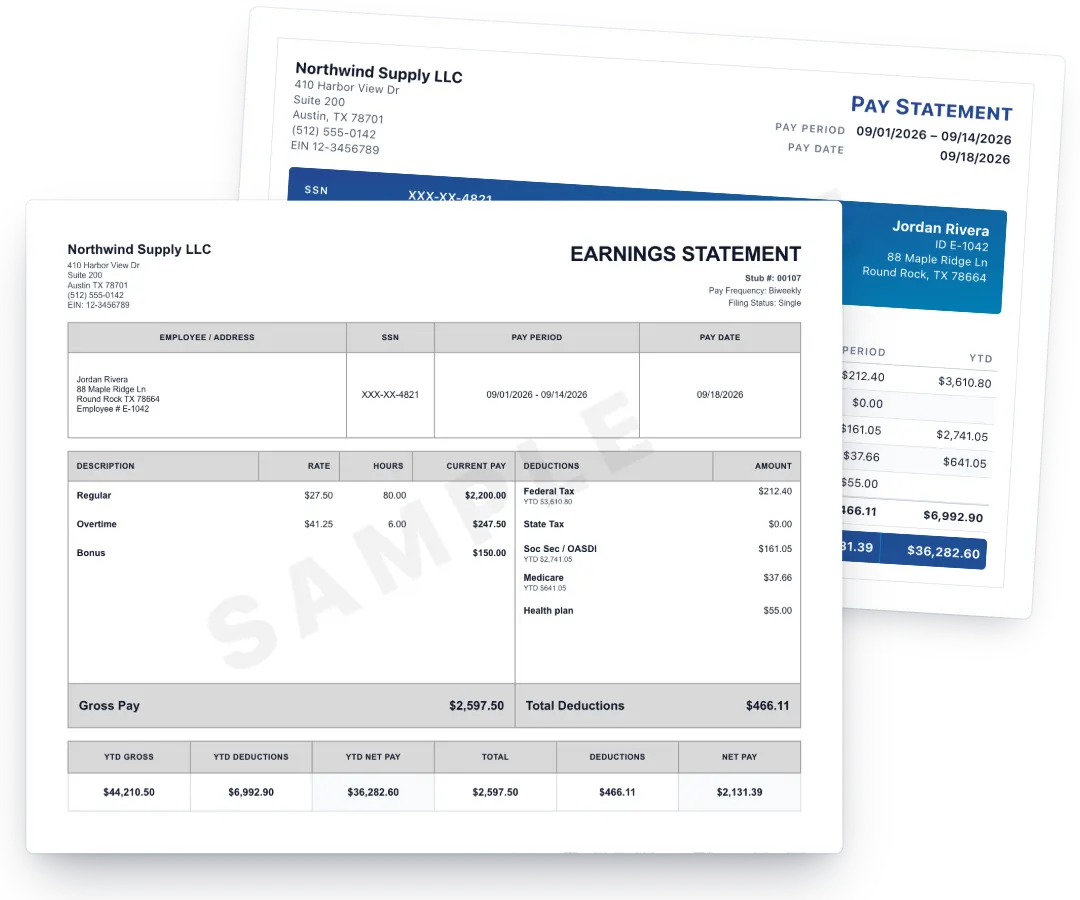
Default
Top pickClassic grid
1,000+ people have used PayStubGo
Enter your pay details, check every line on the live preview, then get your PDF.
Your first pay stub each year is free.Then $2.99 a stub, or from $1.99 per stub in a pack.
Checkout by PayPal
Preview before you pay
Free corrections for 14 days
No subscription, no account
How PayStubGo Works
Nothing to install and no account to set up. Two minutes of typing, one look at the preview, one payment.
Start with a clean layout. Switch any time before you continue.
Company, employee, pay period, earnings and deductions. YTD is optional.
Check the finished stub, then get the PDF when it looks right.
Jump to a part
Example only · your result depends on your W-4 and pay.
Simple Pricing
3-stub pack
Save $1.98$6.99$2.33 / stub
6-stub pack
Save $5.95$11.99$1.99 / stub
Compare
A lower price per stub, with the extras other sites charge for already included. Competitor figures are what each company publishes on its own site.
| Feature | PayStubGo | 123PayStubs | SecurePayStubs | Pay-Stubs.com | StubCreator |
|---|---|---|---|---|---|
| Price per stub | $2.99 | $3.99 | $4.99 | $5.00 | $4.99 |
| First stub free each year | Yes | Yes | With a promo code | No | Yes, each year |
| Templates | 28, all included | 30+ templates | – | – | – |
| Edit taxes | Included, no extra cost | – | – | – | $2.00 add-on per stub |
| Year-to-date totals | Included | Automatic | Automatic | – | Automatic; last-year YTD $2.00 add-on |
| Deposit slip | Free with 3+ stubs | $1.00 add-on per stub | Included | – | $2.00 add-on per stub |
| Corrections | Free for 14 days | Unlimited, free | Unlimited | – | Free edits |
| State withholding | Official 2026 state formulas | Federal and state withholding calculated | Multi-state tax support | – | Latest rules for all 50 states |
| Local taxes | PA local (PSD), NYC, Yonkers, Detroit and more | – | – | – | – |
| PTO, extra earnings, pre-tax deductions | Included | Extra earnings and deductions $2.00 add-on; time off $1.00 add-on | Earnings, deductions and time off included | – | Bonus/overtime "advance tool" $2.00 add-on |
| Subscription | None | None | None | None | – |
Prices and features checked September 2026 on each company's public site: 123PayStubs, SecurePayStubs, Pay-Stubs.com, StubCreator. A dash means the company does not state it on its public pricing page. Their offers may have changed since.
What changed in each state's withholding for 2026, with the official source for every change: 2026 paycheck tax changes, state by state.
Paystub templates
Every one is included in the price. Pick the one that fits.
1 of 28
Why PayStubGo
Most paystub generators charge $3.99 to $5.00 a stub for the same earnings statement, on prices we checked in September 2026. PayStubGo does the withholding math for the state you pick, shows you every line before you pay, and charges $2.99, or $6.99 for a 3-stub pack when you need two or three months of pay records.
Start with the free paystub generator, see how the pay stub generator calculates each tax line, or look at a sample pay stub first. Paid by paper check? Use the check stub maker.
The 2–3 recent stubs a landlord or lender asks for, as consecutive pay periods from one set of details.
See how →Employee pay stubs with estimated withholding and overtime, without a payroll subscription.
See how →Your business as payer, your draw or salary per period, YTD totals that match your books.
See how →Contractor mode keeps withholding at zero and still gives you a dated, professional record.
See how →Guides
Plain explanations of what a stub shows and what to check, before you make your first one.
The employer, employee, pay period, earnings and deduction details a stub carries.
The errors worth catching in the preview, before the PDF is final.
When a guided builder saves time and when a fixed layout is enough.
FAQ
Your first pay stub each year is free on any template, delivered as a PDF to your email. After that you pay per stub, and 3-stub and 6-stub packs cost less per stub. No subscription, no watermark, and every template is included.
Yes. Federal income tax is estimated from the 2026 withholding brackets and your filing status, Social Security at 6.2%, Medicare at 1.45%, and state income tax for the state you choose. Every figure stays editable so the net can match your real deposit.
That decision belongs to the landlord or lender, and no tool can promise it. Many compare the net pay with bank statements or call the employer. PayStubGo produces a standard earnings statement from the numbers you enter; it does not verify employment, and entering false income is fraud.
Emailing it is how we keep the free offer sustainable. It arrives in about a minute. Paid stubs download instantly and are emailed as well.
Yes. The advanced builder makes up to twelve consecutive pay periods from one set of details, with dates stepped back automatically. Packs cost less per stub than buying them singly, whichever template you choose.
No. It builds pay stubs from the information you provide; it does not run payroll, file taxes, or replace accounting or legal advice. Check every figure before you use the document.
Didn't find what you needed? Visit the PayStubGo FAQ page for more answers.
Two minutes to enter, one look at the preview, and the PDF is in your inbox.