Form W-2
W-2 form generator for employers
Create W-2 forms online for your employees. Type the pay for the year or start from the pay stubs you made here, check the preview, and download Copy B, Copy C and Copy 2 in the official IRS form layout.
Filling in and previewing are free.The download starts at $5.49 per form.
Employer
Employees (one W-2 each)
The boxes fill as you type. A box you change yourself is kept.
Review and download
| Item | Qty | Elsewhere | New customer | Bought a pay stub this year |
|---|---|---|---|---|
| W-2 form | 1 | $10.99 | $5.49 | $4.49 |
Elsewhere: median of 4 sites for this form and year, checked October 2026.
Your PDF is sent here.
How to create a W-2 form online
Enter the employer once.
Pick the tax year and type the employer’s name, address and EIN. The same employer details go on every W-2 in the order.
Add each employee.
Enter the employee’s name, address and social security number. Then fill the boxes one of two ways: type the pay for the year and let the tool fill the wage and tax boxes, or sign in and start from the pay stubs you made on PayStubGo.
Check the preview and the review notes.
The preview is a watermarked picture with the SSN masked. The review notes point out figures that do not agree with each other, such as social security tax (Box 4) against social security wages (Box 3). Fix or confirm each one.
Confirm your email and pay.
Tick the employer confirmation, confirm the delivery email address and pay. No sign-in is needed. Each W-2 arrives as a PDF attachment with Copy B, Copy C and Copy 2.
W-2 generator prices
How many W-2 forms?
Lower price applies if you bought a pay stub this year.
Add-on
Your price · tax year 2026
| Item | Qty | Elsewhere | New customer | Bought a pay stub this year |
|---|---|---|---|---|
| W-2 form × 3 | 3 | $10.99per form | $11.49 | $9.49 |
| Total | $11.49 | $9.49 |
Elsewhere, per form: median of 4 sites for this form and year, checked October 2026.
A number between packs is charged as the lowest-cost mix of packs.
What you get
- Three employee copies in one PDFCopy B for the employee’s federal return, Copy C for the employee’s records and Copy 2 for a state, city or local return, made by filling the IRS’s own Form W-2 for that tax year, with its Notice to Employee and Instructions for Employee pages.
- Sent to you as a PDFEach W-2 arrives as a PDF attached to one email, at the address you confirm. No sign-in is needed to order. Sign in with this email to download again within 1 year.
- Nothing is added to the form: no logo, no watermark and no advert on the PDF you pay for.
- Social security numbers are stored encrypted, shown as the last 4 digits everywhere on the site, and never kept in your browser.
Who this W-2 generator is for
Employers. Under the IRS instructions, you file a Form W-2 for each employee you paid for services in your trade or business during the year, and you give that employee copies of it. This W-2 maker is for the employer named on the form, or for a payroll or tax agent the employer has authorized.
It is not a way to make a W-2 for yourself. An employee’s W-2 comes from their employer, and the figures on it are the employer’s payroll records. Before you can order, you confirm that you are the employer or act for them and that the values are correct to the best of your knowledge.
Two ways to fill in the W-2
From annual pay. Enter the employee’s total pay for the year and any 401(k) contributions. The tool fills wages (Box 1), social security wages and tax (Boxes 3 and 4) and Medicare wages and tax (Boxes 5 and 6) by the form’s own rules: 401(k) deferrals are left out of wages (Box 1) and included in social security and Medicare wages (Boxes 3 and 5), social security wages stop at the year’s wage base, and the two taxes (Boxes 4 and 6) follow the 6.2% and 1.45% rates. Federal and state income tax withheld (Boxes 2 and 17) are filled as estimates and marked as estimates, because only your payroll records show what was actually withheld.
W-2 from pay stubs. If you made the employee’s pay stubs on PayStubGo, sign in and pick the employee. The tool takes the stubs with a pay date in the tax year, carries over the wages, and copies the federal, social security, Medicare, state and local tax withheld. It does not recalculate any of them. A stub counts in the year it was paid, so a period that ends in December and is paid in January belongs on the next year’s W-2.
Either way, every box stays editable, and the review notes tell you when two figures do not agree. Review and confirm all tax-form values before downloading. For why a W-2 and the last pay stub of the year often show different totals, see W-2 vs pay stub.
What goes in each W-2 box
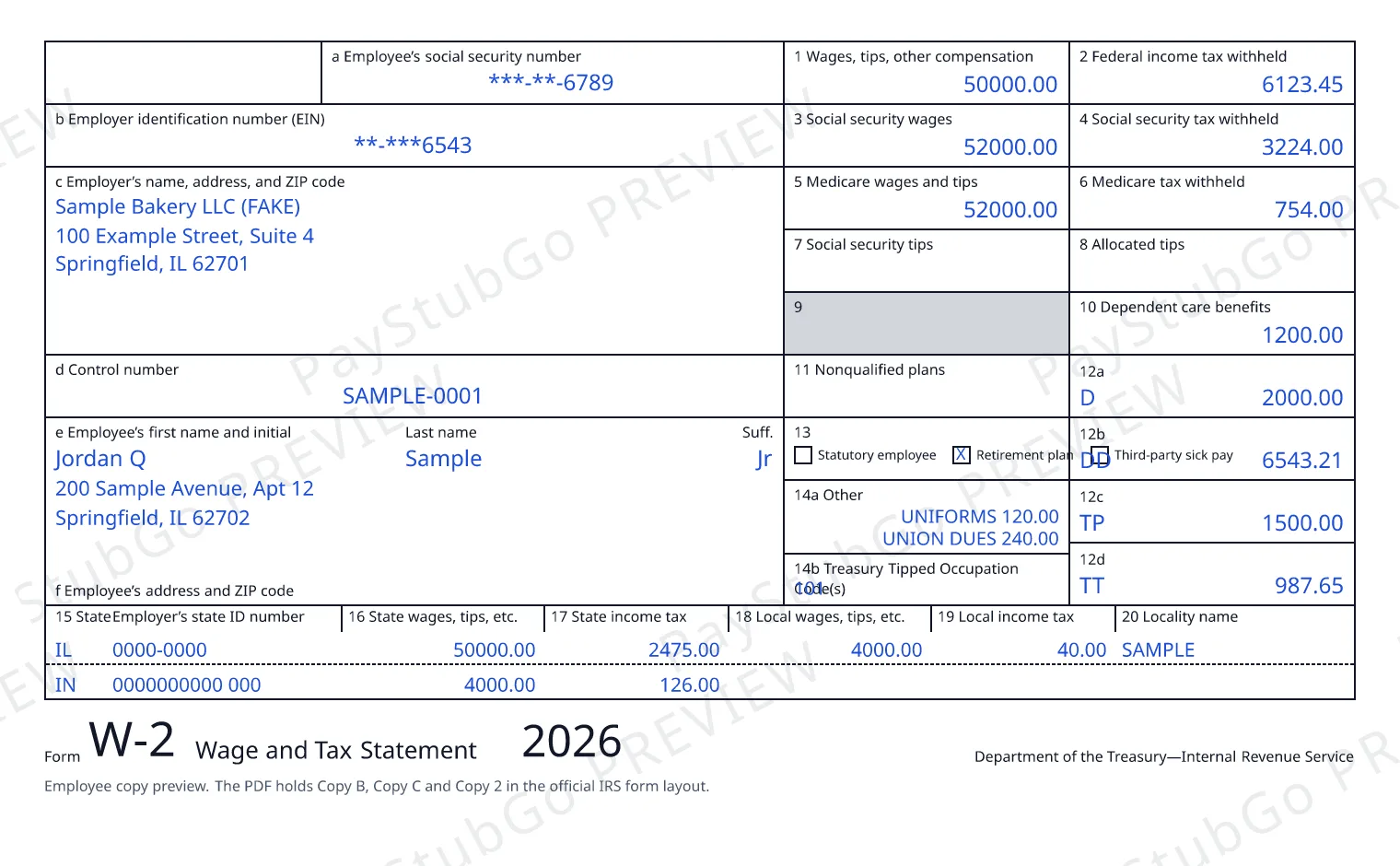
- Boxes a to f identify the employee and the employer: the employee’s social security number, the employer’s EIN, both names and addresses, and an optional control number.
- Box 1 is wages, tips and other compensation. Box 2 is the federal income tax withheld.
- Boxes 3 and 4 are social security wages and the social security tax withheld. Boxes 5 and 6 are Medicare wages and tips and the Medicare tax withheld.
- Boxes 7 and 8 are social security tips and allocated tips. Box 10 is dependent care benefits and Box 11 is nonqualified plans.
- Box 12 holds up to four amounts, each with a letter code. Box 13 has checkboxes for a statutory employee and a retirement plan. Box 14 is for other information the employer wants to give the employee.
- Boxes 15 to 20 are the state and local lines: the state, the employer’s state ID number, state wages and state income tax, then local wages, local income tax and the locality name. The form has room for two of each.
The social security wage base changes each year, and the total of social security wages and tips (Boxes 3 and 7) cannot be more than it: $184,500 for 2026, $176,100 for 2025, $168,600 for 2024, $160,200 for 2023, $147,000 for 2022, $142,800 for 2021. The tool checks this for the year you pick. For the rule behind each box, read the General Instructions for Forms W-2 and W-3.
What changed on the 2026 W-2 form
The 2026 Form W-2 has three codes (Box 12) that earlier years do not: TA for employer contributions to a Trump account, TP for the total cash tips reported to the employer, and TT for total qualified overtime compensation. “Other” (Box 14) became two boxes: 14a, Other, and 14b, Treasury Tipped Occupation Code(s), which the instructions say to use when cash tips are reported with code TP (Box 12).
The tool shows these fields when you pick 2026 and hides them for earlier years, because each year is made from that year’s own form. It prints the amounts and codes you enter. It does not work out which tips or overtime qualify.
W-2 copies: what you get and what you do not
A Form W-2 has six copies. Copy A goes to the Social Security Administration, Copy 1 to a state, city or local tax department, Copies B, C and 2 to the employee, and Copy D stays with the employer. PayStubGo makes the three employee copies.
Copy A is not included, on purpose. The IRS says the Copy A it publishes online is for information only: it does not meet the SSA’s requirements for scanning, and you must not print it and file it. Employers file W-2s with the SSA, and the SSA offers a free way to do it online: Business Services Online.
The employee’s social security number is shown as ***-**- and the last four digits on the copies unless you choose the full number. The employer’s EIN is always printed in full.
When W-2 forms are due to employees
| Tax year | Copies B, C and 2 due to employees |
|---|---|
| 2026 | February 1, 2027 |
| 2025 | February 2, 2026 |
| 2024 | January 31, 2025 |
| 2023 | January 31, 2024 |
| 2022 | January 31, 2023 |
| 2021 | January 31, 2022 |
These are the dates in each year’s IRS instructions. A form counts as furnished when it is properly addressed and mailed on or before the due date. A W-2 for an earlier year can still be made here, for example when an original was never given out.
Add a W-3 Form to the order
Form W-3 is the one-page summary that totals an employer’s W-2s for the year. Tick the add-on at checkout and one W-3 Form is made for the employer and tax year in the order, for $2.49. Every total on it is the sum of that box across the W-2s in the same order, so nothing is typed twice. For your records. Not for filing with the SSA.
More about it: W-3 Form.
Tax years you can make a W-2 for
The tool is open for tax years 2026, 2025, 2024, 2023, 2022 and 2021. Each year uses that year’s own IRS form, so the layout, the codes (Box 12) and the wage base are the ones that applied then. If you already gave an employee a W-2 for a year and need to change it, that is a corrected form, Form W-2c, which this tool does not make.
All tax form pages are listed on the tax forms hub.
Questions
W-2 generator FAQ
Who can use this W-2 generator?
Employers, and payroll or tax agents an employer has authorized. An employer must give each employee a Form W-2 for the year, and this tool makes the employee copies. It is not for making a W-2 for yourself: if you are the employee, ask your employer for your W-2.
Can I create a W-2 from pay stubs?
Yes. This is the one part that needs you to sign in: sign in, pick the tax year, and the tool lists the employees you made pay stubs for on PayStubGo with a pay date in that year. It carries over the year’s wages and copies the tax withheld from those stubs. Nothing is recalculated. You then review every box, add what a pay stub does not hold, such as the SSN and any codes (Box 12), and confirm.
Is there a free W-2 generator?
Filling in the form and seeing the watermarked preview are free here. The download is paid: $5.49 for one W-2, less per form in a pack. The IRS publishes the blank Form W-2 on IRS.gov, and the SSA lets employers create and file W-2s online for free through Business Services Online.
Does PayStubGo file W-2 forms with the SSA or the IRS?
No. PayStubGo makes the copies you give to your employee. Filing Copy A and Form W-3 with the Social Security Administration stays with the employer. If you must file 10 or more information returns in total for the year (W-2s and 1099s counted together), you must e-file.
Which copies of the W-2 do I get?
Copy B, Copy C and Copy 2, the three copies an employee receives, in one PDF with the IRS’s own Notice to Employee and Instructions for Employee pages. Copy A is not included. The IRS says Copy A printed from its website does not meet the SSA’s requirements for scanning and must not be filed.
Does the W-2 show the employee’s full social security number?
By default the employee copies show only the last four digits, in the form ***-**-1234. The IRS instructions allow an employer to truncate the SSN on employee copies. You can choose to print the full number instead. The employer’s EIN is always printed in full, because the instructions say not to truncate it.
When are W-2 forms due to employees?
An employer must generally furnish Copies B, C and 2 to each employee early in the year after the tax year. The IRS instructions give the date for each tax year: February 1, 2027 for tax year 2026, February 2, 2026 for tax year 2025, January 31, 2025 for tax year 2024, January 31, 2024 for tax year 2023, January 31, 2023 for tax year 2022 and January 31, 2022 for tax year 2021. A form counts as furnished when it is properly addressed and mailed on or before the due date.
What is new on the 2026 W-2 form?
The 2026 form adds three codes (Box 12): TA for employer contributions to a Trump account, TP for the total cash tips reported to the employer, and TT for total qualified overtime compensation. “Other” (Box 14) is split in two: 14a “Other” and 14b for Treasury Tipped Occupation Codes. The tool has these fields for 2026 only. It prints the amounts you enter and does not work them out.
Which tax years can I make a W-2 for?
Tax years 2026, 2025, 2024, 2023, 2022 and 2021 can be ordered now. Each year is made from that year’s own official IRS form, so a 2026 W-2 form and an earlier year’s form are never mixed up.
How much does it cost to create a W-2?
$5.49 for one form. Packs of 1, 3, 5 and 10 bring the price per form down, to $32.99 for 10. If you bought a pay stub this calendar year, the prices are $4.49 for one and $27.99 for 10. A Form W-3 for the same employer and year is an optional $2.49 add-on. The total is shown before you pay.
Who gets the lower price?
Anyone who bought a pay stub this calendar year. It is matched by your delivery email: type the email you bought the pay stub with at checkout and the lower price is applied automatically, with no sign-in. The free stub does not count. “This calendar year” is the year you place the order, not the tax year of the form. One pay stub you bought is enough, and nothing carries over from another email address. Form W-3 and the completed Form W-9 cost the same for everyone.
Why is the W-3 Form here not for filing with the SSA?
Because a form printed from a download is not the scannable form the SSA takes on paper. The IRS says so on the first page of its own W-2 and W-3 files: the official printed version is scannable, the version printed from its website is not, and a penalty may be imposed for filing forms that can’t be scanned. The IRS instructions add that the SSA accepts only e-filed reports and the official red-ink versions of these forms, or substitutes it has accepted. If you must file 10 or more information returns for the year, W-2s and 1099s counted together, you must e-file them all. Employers can file with the SSA online through Business Services Online, which creates the Form W-3 from the W-2s by itself. Keep the Form W-3 you download here with your records.
Do I need an account to order a W-2?
No. You can fill in, preview and order without signing in. The order is saved under the delivery email address you confirm, and the PDFs are sent there. Signing in is only needed to start from your PayStubGo pay stubs.
Can I email the W-2 to my employee?
PayStubGo sends the PDF to you, the buyer, and getting it to your employee is your responsibility. Paper copies can be printed and handed over or mailed. IRS Publication 1141 says employee copies may be furnished electronically only if the employee consents, and it lists disclosures the employer must give first.
Can I fix a W-2 I already gave to an employee?
Not with this tool, which makes original W-2s only. A W-2 that was already given out is corrected with Form W-2c, Corrected Wage and Tax Statement. The IRS instructions say employers can create and submit Forms W-2c through the SSA’s Business Services Online. If the first copy was never given out, you can make it again here.