Form W-9
Fillable W-9 form: fill out online, then print and sign
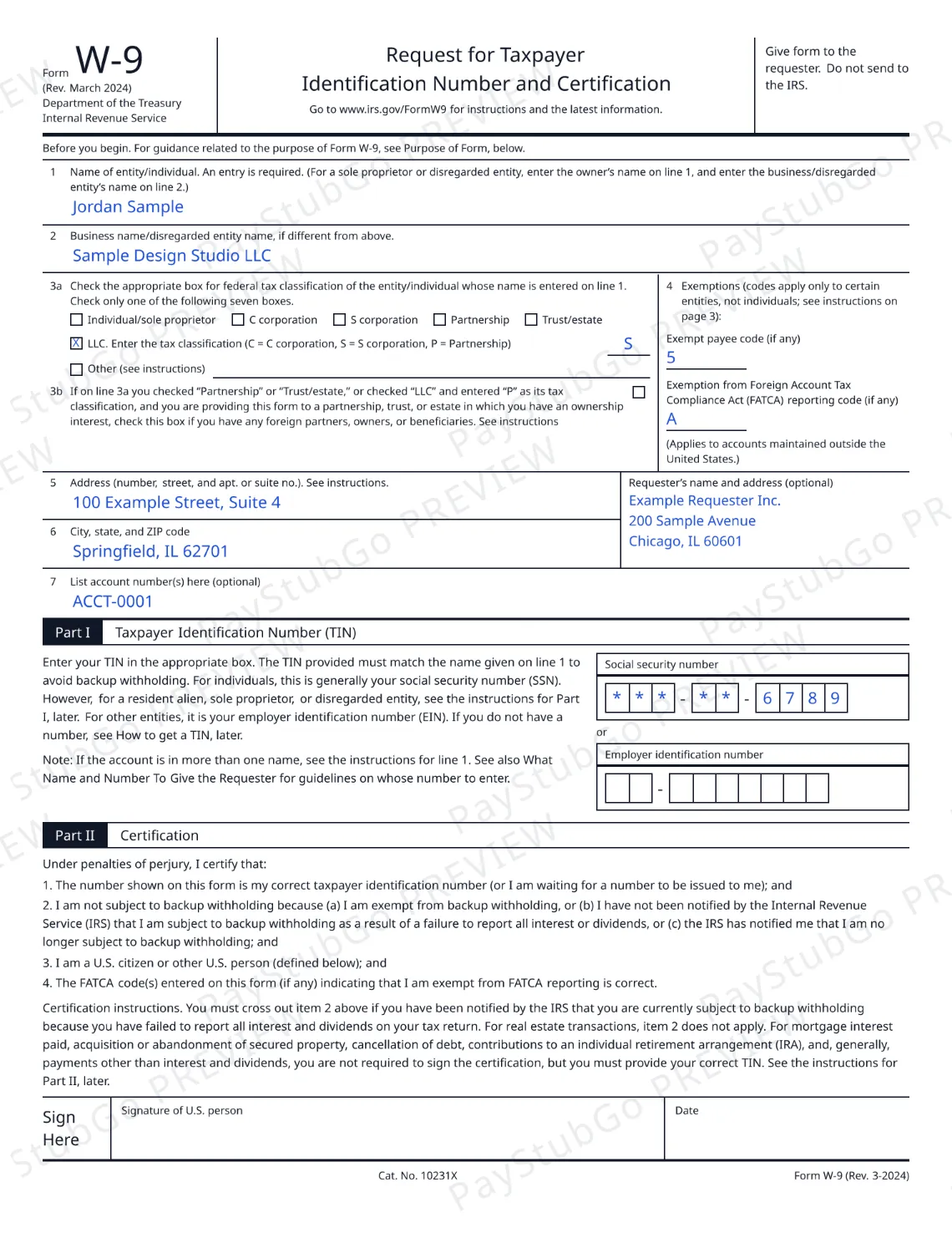
Type your name, tax classification, address and taxpayer ID, and see them on the current W-9 form (Rev. March 2024) in the official IRS form layout.
Filling in and previewing are free.The completed PDF is a paid download.
Are you a U.S. citizen or U.S. resident alien (or a U.S. entity)?
The blank Form W-9 is free from IRS.gov: About Form W-9.
How to fill out a W-9 online
Answer one question.
The tool first asks whether you are a U.S. person, because Form W-9 is only for U.S. persons.
Fill in the lines.
Type your name, tax classification, address and taxpayer ID. A moment after you stop typing, each entry appears on the preview in the place the IRS form puts it.
Check the preview.
Open the larger view and read your entries. The preview is a watermarked picture and shows only the last 4 digits of your taxpayer ID. Fix anything that looks wrong and it redraws.
Download, print and sign.
Confirm your email address, pay for the download, and the completed PDF arrives as an email attachment, without the watermark and with your full taxpayer ID. Print it, then sign and date it by hand.
What you get
- A free on-screen fill and preview of Form W-9 (Rev. March 2024) in the official IRS form layout. The preview carries a “PayStubGo PREVIEW” watermark and masks your taxpayer ID; it is for checking your entries, not for handing in.
- A completed PDF for $5.49, made after your payment is confirmed: no watermark, your full taxpayer ID, sent to the email address you confirm as an attachment, and kept in your account so you can download it again for 1 year.
- Empty signature and date lines, ready for you to sign by hand.
- A draft that stays in this browser tab while you work. Your taxpayer ID is never part of that draft and is not saved in your browser.
What is a W-9 form used for?
A W-9 form gives your correct name and taxpayer ID to someone who has to report payments to the IRS. Its full name is Form W-9, Request for Taxpayer Identification Number and Certification.
It is a short form: seven numbered lines for your name, business name, federal tax classification, exemption codes, address and account numbers; Part I for your taxpayer identification number (TIN); and Part II, a certification that you sign under penalties of perjury.
The form does not go to the IRS. Its own heading says to give it to the requester. It carries no dollar amounts and reports no income. The requester uses your details later, on information returns such as Form 1099-NEC.
Who needs a W-9, and who asks for one
You fill out a W-9 when a person or business that pays you asks for one. The form’s instructions call that person the requester: someone who is required to file an information return with the IRS and must get your correct taxpayer ID to do it.
A business that pays a contractor, a client that pays a freelancer and a business that pays rent are common examples. The form is only for U.S. persons, including resident aliens.
The requester keeps your W-9 and uses the name and number on it when they prepare forms such as Form 1099-NEC or Form 1099-MISC. If you are the one paying, see which 1099 form you need.
A W-9 only gives your name and taxpayer ID to a payer. It does not decide whether you are an employee or an independent contractor.
W-9 line by line
- Line 1 is the name of the entity or individual. An entry is required, and the taxpayer ID in Part I must match it.
- Line 2 is the business name or disregarded entity name, only if it differs from line 1.
- Line 3a is the federal tax classification. The form gives seven boxes and says to check only one. The LLC box also asks for a code: C, S or P. Line 3b is a single checkbox about foreign partners, owners or beneficiaries.
- Line 4 holds two optional codes, the exempt payee code and the FATCA reporting code. The form says these apply only to certain entities, not individuals.
- Lines 5 and 6 are your address: number, street and apartment or suite, then city, state and ZIP code.
- Line 7 is for account numbers and is optional.
- Part I is the taxpayer ID, entered either as a social security number or as an employer identification number.
- Part II is the certification, followed by the signature and date lines.
This tool does not tell you which classification to choose. For what the IRS says about each line, read how to fill out a W-9 form, line by line.
Signing a W-9: print it, then sign by hand
The certification in Part II is a statement you make under penalties of perjury, and the signature line under it is labelled “Signature of U.S. person”. PayStubGo leaves that line and the date line empty on the preview and on the PDF.
Print this form, then sign and date it by hand before you give it to the requester. A name typed into a form on this site is not a signature, and PayStubGo does not offer one.
Not a U.S. person? You likely need a W-8
Form W-9 is for U.S. persons. Foreign persons generally use a Form W-8 (or Form 8233). IRS: About Form W-8BEN
Item 3 of the W-9 certification reads “I am a U.S. citizen or other U.S. person”, so a person who cannot certify that should not sign a W-9. That is why the tool asks first and offers no download when the answer is no.
Common W-9 mistakes
- A name that does not match the number. The form says the TIN must match the name given on line 1.
- More than one box checked on line 3a. The form says to check only one of the seven boxes.
- The LLC box without a code. When the LLC box is checked, the form asks for C, S or P in the entry space.
- A missing or mistyped digit. An SSN and an EIN each have nine digits. The tool checks the count; it cannot check that the number is yours.
- Handing it over unsigned. Print the form, then sign and date it by hand.
- Sending it to the IRS. The form goes to the requester.
- Using an old revision. Check the revision date printed on the form; the current one is Rev. March 2024.
Fillable, printable or blank W-9 PDF: your options
You have three ways to complete a W-9. The blank W-9 form is a free PDF from IRS.gov. You can open it and type into it, or print it and write on it: About Form W-9. On PayStubGo the W-9 is fillable online: you type your entries and see a watermarked preview free, with each entry checked for the basics as you go. And if you want the completed form as a PDF in your inbox and your account, the download is $5.49.
Whichever way you choose, the last step is the same: print it, sign it, date it, and give it to the requester.
Questions
W-9 form FAQ
Is there a free W-9 form?
Yes. The blank Form W-9 is free from IRS.gov, and you can print it and fill it in by hand. On PayStubGo, filling in the form online and seeing a watermarked preview in the official layout are free too. Only the download of your completed PDF is paid: $5.49, sent to your email.
Is there a 2026 W-9 form?
Form W-9 carries a revision date, not a tax year. The current form is Form W-9, Rev. March 2024, and the IRS listed no newer revision when this page was last checked. This tool follows that revision line for line. The revision date is printed under the form number at the top left of the form and again in the footer, so you can check any copy you are handed.
What is a W-9 form used for?
A W-9 gives your correct name and taxpayer ID to a person or business that has to report payments to the IRS. The form’s instructions call that person the requester. The requester uses your details on information returns such as Form 1099-NEC for nonemployee compensation. The W-9 itself shows no dollar amounts.
Do I send my W-9 to the IRS?
No. The form itself says to give it to the requester and not to send it to the IRS. The requester is the person or business that asked you for it, usually because they pay you and need your name and taxpayer ID for their own records and reporting. Keep a copy of what you hand over.
Does a W-9 need to be signed?
The instructions for Part II say when a signature is required. For some kinds of payment you must give your correct taxpayer ID but do not have to sign the certification, and a requester may still ask you to sign. PayStubGo leaves the signature and date lines empty. Print this form, then sign and date it by hand before you give it to the requester.
Can I sign a W-9 electronically?
Not on PayStubGo. The signature and date lines are left empty, and a typed name is not treated as a signature. Print this form, then sign and date it by hand before you give it to the requester. If your requester runs its own system for receiving W-9s electronically, that is between you and the requester.
Do W-9 forms expire?
The form’s instructions give no expiry date. They do say you must give a new Form W-9 if the name or taxpayer ID changes for the account, and updated information if you claimed to be an exempt payee and no longer are one. A requester can also ask you for a fresh form.
Is a W-9 the same as a 1099?
No. You fill out the W-9 and give it to the payer. The payer keeps it and later uses the name and taxpayer ID on it to prepare an information return, such as Form 1099-NEC for nonemployee compensation or Form 1099-MISC for rents and royalties.
I am not a U.S. person. Do I use a W-9 or a W-8?
Form W-9 is for U.S. persons. Foreign persons generally use a Form W-8 (or Form 8233). The tool asks this question first and stops there if the answer is no, so you do not fill in a form that does not apply to you.
Does a W-9 make me an independent contractor?
A W-9 only gives your name and taxpayer ID to a payer. It does not decide whether you are an employee or an independent contractor. The form has no line that asks about, or settles, how you work with the payer.
Is it safe to fill out a W-9 online?
A W-9 carries your taxpayer ID, so know who you are giving it to. On PayStubGo the preview shows only the last 4 digits of the number, and the draft kept in your browser tab never includes it. When you order the PDF, the number is stored encrypted and the file goes to the email address you confirm.