Form W-9 guide
How to fill out a W-9 form
To fill out a W-9, enter your name on line 1, check one tax classification box on line 3a, add your address, and enter your SSN or EIN in Part I. Then sign and date it and give it to the requester, not the IRS. This guide takes Form W-9 (Rev. March 2024) line by line, quoting the form and its instructions.
Last updated
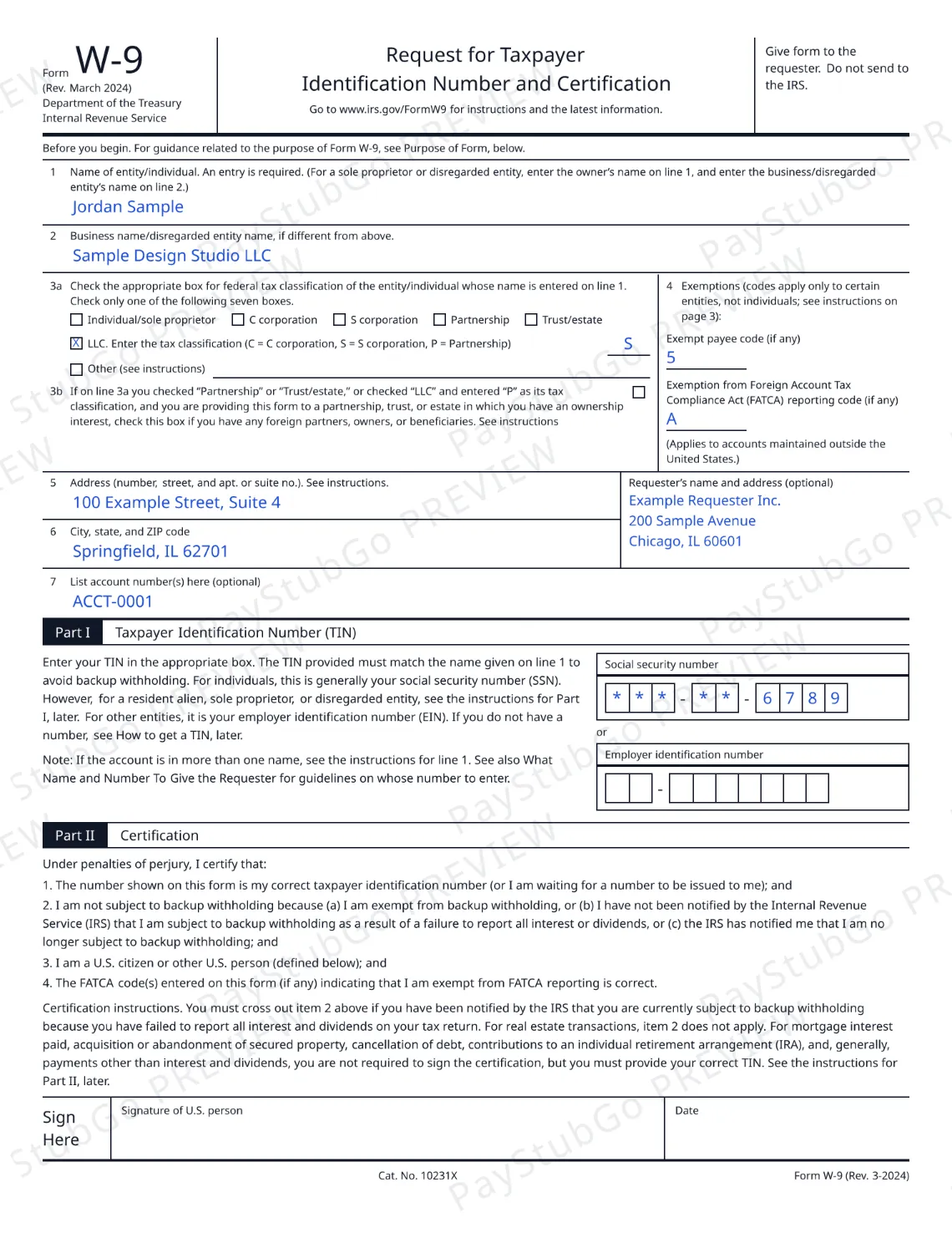
How to fill out a W-9, step by step
- Line 1: your name. Enter your name as shown on your tax return. A sole proprietor or the owner of a disregarded entity enters the owner’s name here.
- Line 2: business name. Enter a business, trade or “doing business as” name only if it differs from line 1.
- Line 3a: federal tax classification. Check one of the seven boxes. If you check the LLC box, also enter the code C, S or P. Line 3b applies only to certain partnerships, trusts and estates.
- Line 4: exemption codes. Enter an exempt payee code or a FATCA code only if one applies. The form says these codes apply only to certain entities, not individuals.
- Lines 5 to 7: address and account numbers. Enter your street address on line 5 and your city, state and ZIP code on line 6. Line 7, for account numbers, is optional.
- Part I: taxpayer ID. Enter your social security number or your employer identification number. It must match the name on line 1.
- Part II: sign and date. Read the certification, then sign and date the form by hand and give it to the requester. Do not send it to the IRS.
The sections below go through each line. If your question is about one situation, jump to individuals and sole proprietors or LLCs.
Before you start
Form W-9 is for U.S. persons. Foreign persons generally use a Form W-8 (or Form 8233). IRS: About Form W-8BEN
The form itself says: Give form to the requester. Do not send to the IRS. The IRS publishes the form and its instructions at About Form W-9.
Lines 1 and 2: name and business name
Line 1
Name of entity/individual. An entry is required. (For a sole proprietor or disregarded entity, enter the owner’s name on line 1, and enter the business/disregarded entity’s name on line 2.)
An entry on line 1 is required. The taxpayer ID you give in Part I must match this name.
Line 2
Business name/disregarded entity name, if different from above.
Leave line 2 empty when there is no separate business name.
Line 3a and 3b: federal tax classification
Line 3a
Check the appropriate box for federal tax classification of the entity/individual whose name is entered on line 1. Check only one of the following seven boxes.
The seven boxes are:
- Individual/sole proprietor
- C corporation
- S corporation
- Partnership
- Trust/estate
- LLC
- Other (see instructions)
If you check the LLC box, the form asks for a code: C = C corporation, S = S corporation, P = Partnership.
Check the “LLC” box above and, in the entry space, enter the appropriate code (C, S, or P) for the tax classification of the LLC, unless it is a disregarded entity. A disregarded entity should instead check the appropriate box for the tax classification of its owner.
Line 3b
If on line 3a you checked “Partnership” or “Trust/estate,” or checked “LLC” and entered “P” as its tax classification, and you are providing this form to a partnership, trust, or estate in which you have an ownership interest, check this box if you have any foreign partners, owners, or beneficiaries. See instructions
Line 4: exempt payee code and FATCA code
Exemptions (codes apply only to certain entities, not individuals; see instructions on page 3):
There are two entry spaces: “Exempt payee code (if any)” and “Exemption from Foreign Account Tax Compliance Act (FATCA) reporting code (if any)”. The second one carries the note “(Applies to accounts maintained outside the United States.)” The instructions add that, generally, individuals, including sole proprietors, are not exempt from backup withholding.
Lines 5, 6 and 7: address and account numbers
- Line 5: Address (number, street, and apt. or suite no.). See instructions.
- Line 6: City, state, and ZIP code
- Line 7: List account number(s) here (optional)
To the right of lines 5 and 6 there is an optional box for the requester’s name and address.
Part I: SSN or EIN (your taxpayer ID)
Enter your TIN in the appropriate box. The TIN provided must match the name given on line 1 to avoid backup withholding. For individuals, this is generally your social security number (SSN). However, for a resident alien, sole proprietor, or disregarded entity, see the instructions for Part I, later. For other entities, it is your employer identification number (EIN). If you do not have a number, see How to get a TIN, later.
You enter the number in one of two boxes: “Social security number” or “Employer identification number”.
Part II: certification and signature
Under penalties of perjury, I certify that:
- The number shown on this form is my correct taxpayer identification number (or I am waiting for a number to be issued to me); and
- I am not subject to backup withholding because (a) I am exempt from backup withholding, or (b) I have not been notified by the Internal Revenue Service (IRS) that I am subject to backup withholding as a result of a failure to report all interest or dividends, or (c) the IRS has notified me that I am no longer subject to backup withholding; and
- I am a U.S. citizen or other U.S. person (defined below); and
- The FATCA code(s) entered on this form (if any) indicating that I am exempt from FATCA reporting is correct.
You must cross out item 2 above if you have been notified by the IRS that you are currently subject to backup withholding because you have failed to report all interest and dividends on your tax return. For real estate transactions, item 2 does not apply. For mortgage interest paid, acquisition or abandonment of secured property, cancellation of debt, contributions to an individual retirement arrangement (IRA), and, generally, payments other than interest and dividends, you are not required to sign the certification, but you must provide your correct TIN. See the instructions for Part II, later.
On PayStubGo the signature and date lines are left empty. Print this form, then sign and date it by hand before you give it to the requester. You can fill out a W-9 form online and preview it free.
How to fill out a W-9 as an individual or sole proprietor
This is what the Form W-9 instructions say for an individual and for a sole proprietor.
- Line 1: an individual generally enters the name shown on their tax return. A sole proprietor enters their individual name as shown on their Form 1040.
- Line 2: a sole proprietor enters any business, trade or “doing business as” (DBA) name here. Otherwise it stays empty.
- Line 3a: the instructions point an individual or a sole proprietorship to the “Individual/sole proprietor” box.
- Line 4: generally, individuals, including sole proprietors, are not exempt from backup withholding.
- Part I: for individuals the number is generally the social security number. A sole proprietor who has an EIN may enter either the SSN or the EIN.
How to fill out a W-9 for an LLC
How an LLC fills out a W-9 depends on how it is taxed. The instructions describe two cases.
A single-member LLC that is a disregarded entity
In general, a business entity that has a single owner and is not a corporation is disregarded as an entity separate from its owner.
- Line 1: the owner’s name. The instructions say the name on line 1 should never be a disregarded entity.
- Line 2: the LLC’s name.
- Line 3a: the box for the owner’s tax classification, not the LLC box.
- Part I: the owner’s SSN, or the owner’s EIN if the owner has one.
An LLC taxed as a partnership or a corporation
- Line 1: the entity’s name as shown on the entity’s tax return, with any business, trade or DBA name on line 2.
- Line 3a: the LLC box, with the code for its tax classification: P for partnership, C for C corporation or S for S corporation.
- Part I: the entity’s EIN.
A disregarded U.S. entity that has a foreign owner must use the appropriate Form W-8 instead. PayStubGo does not tell you how your LLC is taxed; if you are not sure, check the LLC’s own tax filings or ask a tax professional.